Introduction
A Shopify Plus migration is not a platform switch. It is a business operation that touches every part of your digital commerce setup: your product data, customer records, order history, ERP connections, payment gateways, checkout logic, and organic search rankings. Done well, it clears the path for faster growth on a platform built for scale. Done poorly, it can cost you months of recovery work and a significant drop in organic traffic you may not fully win back.
There are now over 47,000 merchants on Shopify Plus globally. The platform has matured considerably, and for many enterprise brands still running Magento 2, WooCommerce, or custom legacy systems, the migration conversation is no longer a question of if it is a question of when, and how to do it without breaking what already works.
This guide was put together by the KiwiCommerce team Shopify Experts and Adobe Commerce Certified developers based in Cheshire, UK. We hold certified expertise on both sides of this migration: Magento and Adobe Commerce on the outgoing platform, Shopify Plus on the incoming one. That dual-platform knowledge is what this guide is built on.
Is Shopify Plus Actually Right for Your Enterprise?
Before any migration planning begins, this question deserves a straight answer.
Shopify Plus makes commercial sense when your current platform is creating operational friction that directly costs you time, money, or market opportunity. That typically looks like: developers spending disproportionate time on infrastructure maintenance instead of new features; peak traffic events Black Friday, product launches, wholesale portal logins causing performance degradation; international expansion becoming genuinely complicated by your current platform architecture; or checkout logic that has become increasingly difficult to maintain and extend.
At £1,800 to £2,000 per month (based on Shopify Plus starting at approximately $2,300 to $2,500 USD per month), the platform cost is meaningful. The offset is what you stop paying for separately: hosting, CDN, security patching, platform updates, and server scaling during traffic spikes are all included. For merchants managing their own Magento or custom infrastructure, this often represents a net saving once all infrastructure costs are properly accounted for.
Shopify Plus is probably not the right answer if your operation depends on genuinely complex B2B catalogue logic, multi-warehouse inventory rules, or deep ERP-driven product configurations that Magento handles natively. Some of these capabilities exist on Shopify Plus; others require custom development that can negate the platform’s simplicity advantage. A proper pre-migration assessment should answer this question for your specific setup before any commitment is made.
Our Shopify vs Shopify Plus guide covers the feature distinction between standard and Plus plans for UK businesses weighing the options.
What Shopify Plus Actually Gives You in 2026
Understanding what you are moving to matters as much as understanding what you are leaving. Shopify Plus in 2026 is a meaningfully different platform from what it was three years ago.
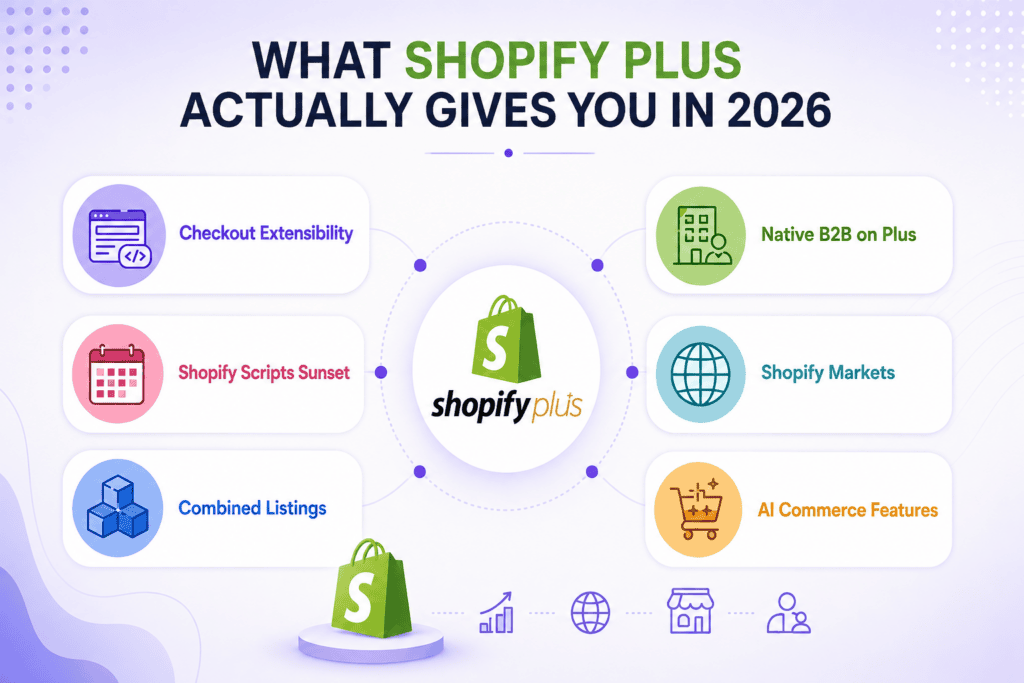
Checkout Extensibility replaced the old checkout.liquid template in August 2024. New Plus merchants now customise checkout through Shopify’s Checkout Editor and Shopify Functions, a code-based approach using Rust or JavaScript that runs natively inside Shopify’s infrastructure. This is faster and more stable than the old customisation approach, but it is a different development paradigm. Any custom checkout logic from your current platform needs to be rewritten in Functions, not ported.
Shopify Scripts sunset is a hard deadline for any brand currently running custom checkout logic through the old Ruby-based Scripts system. New installs were blocked from August 2025. Full end-of-life is June 30, 2026. If your migration timeline puts your go-live after that date, Shopify Scripts cannot be part of your checkout setup regardless of what your current platform uses.
Combined Listings introduced in late 2025 removed the previous 100-variant-per-product limit. Products on Shopify Plus can now support up to 2,048 variants through connected child products, each with its own media and descriptions. For fashion, footwear, or any catalogue with deep size/colour matrices, this is a significant structural improvement.
Native B2B on Plus includes company-specific pricing, net payment terms (net 30, net 60), self-service buyer portals, and company account management all without separate wholesale store setups. Brands that previously maintained a separate B2B portal and a consumer storefront can consolidate into a single Plus store.
Shopify Markets handles international storefronts, localised currencies, VAT handling by region, and language switching from a single Plus store without the need for separate domain setups per country.
AI commerce features available on Plus include agentic storefronts discoverable via ChatGPT and Google AI Mode, predictive analytics for inventory, and AI-driven personalisation tools. These are early-stage but represent where Shopify’s product roadmap is heading.
When NOT to Migrate (Yet)
A few situations genuinely warrant pausing or deferring a migration, regardless of how compelling the platform looks.
Within eight weeks of a major trading event. If Black Friday, a product launch, or a peak wholesale ordering period falls within eight weeks of your planned go-live, move the timeline. The risks of post-launch issues coinciding with peak revenue periods are not worth it.
With dirty or unstructured data. Migrating a product catalogue with inconsistent naming conventions, missing metafields, duplicate SKUs, or incomplete customer records amplifies every problem rather than resolving them. Clean and structure your data before migration starts, not during.
Without a development partner available for two weeks post-launch. The first two weeks after go-live are the highest-risk period. Issues that did not surface in staging emerge in production. You need your development team available daily during this window, not in a queue.
If your checkout logic is complex and undocumented. If your current checkout runs on Shopify Scripts, Magento custom modules, or legacy PHP that no one on your current team fully understands, that logic needs to be properly audited and documented before anyone starts rebuilding it in Shopify Functions.
The Migration Process: Stage by Stage
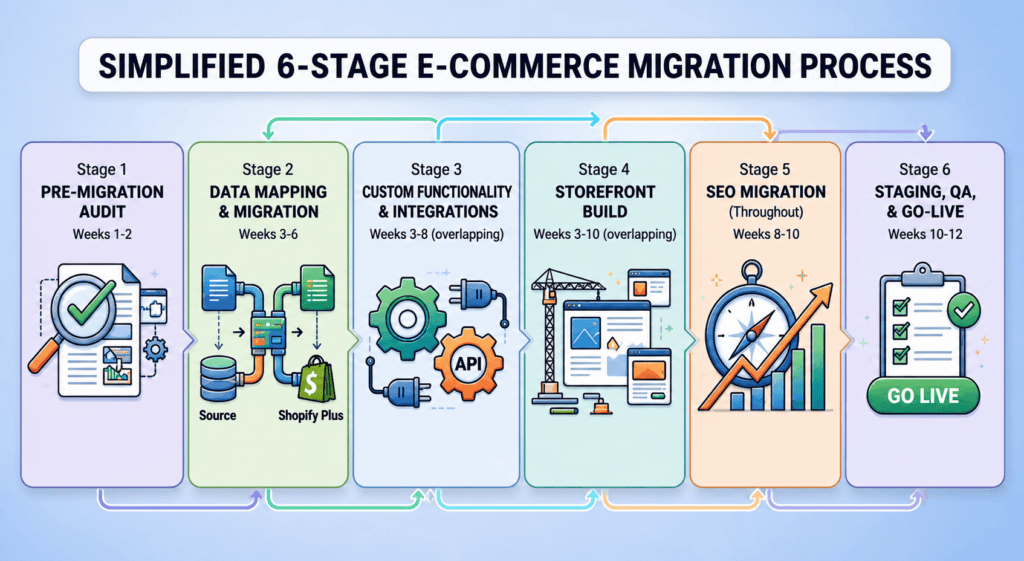
Stage 1 Pre-migration audit (weeks 1–2)
This is the single stage that most brands underinvest in, and the one that most predicts whether the migration goes well or badly.
The audit covers: your full product catalogue structure and data quality; customer records and whether they are clean enough to transfer; order history and whether you need it in Shopify or read-only archive access is sufficient; every third-party integration ERP, CRM, PIM, 3PL, payment gateways, subscription tools, loyalty platforms; all custom functionality on your current platform and what Shopify Plus equivalent or custom development is needed; your current URL structure and the redirect map needed to protect organic rankings; and your current SEO baseline Core Web Vitals scores, ranking positions, and indexed page count so you have something to measure against post-launch.
The output of the audit is a clear project scope: what needs building, what integrations need reworking, what the realistic timeline is, and what the migration will cost. Our Shopify Migration Services team runs this audit as a standalone engagement for merchants who want an honest assessment before committing to a full project. Our Magento to Shopify Plus migration checklist is useful preparatory reading before this stage.
Stage 2 Data mapping and migration (weeks 3–6)
Enterprise data migrations involve more than exporting a CSV and importing it. Products, variants, customer records, order history, content pages, discount codes, and gift card balances all have different structures on different platforms, and those structures need to be mapped explicitly before transfer begins.
Products and variants: Products move first. Shopify’s new Taxonomy should be applied during the import using Matrixify (the standard tool for Plus migrations) ensures metafields, tags, and pricing rules transfer with correct field mapping. The Combined Listings structure for variants above 100 needs to be set up during this stage, not retrofitted.
Customer records: Customer accounts transfer including addresses and order history associations. Passwords cannot transfer between platforms customers will need to reset passwords after migration. Communicate this proactively rather than letting customers discover it on login.
Order history: Historical orders are typically migrated as read-only records for customer service continuity. Full order functionality on historical records is not always possible depending on the source platform. Agree with your team which historical data is genuinely needed versus what can be archived externally.
Content and metadata: Blog posts, landing pages, and CMS content need to transfer with their metadata intact titles, descriptions, canonical URLs. Missing or corrupted metadata is one of the most common sources of post-migration SEO loss.
For brands coming from WooCommerce specifically, our WooCommerce to Shopify migration service covers the specific data handling required for that platform’s structure.
Stage 3 Custom functionality and integrations (weeks 3–8, overlapping)
Every piece of custom functionality on your current platform needs a Shopify Plus equivalent or a custom build. There is no automatic carry-over.
Checkout logic: Any logic currently running in Shopify Scripts needs to be rewritten into Shopify Functions before June 30, 2026. Logic from Magento custom modules or WooCommerce plugins needs equivalent Function builds or, where Shopify handles it natively, removal and replacement with the platform’s out-of-box approach.
ERP integration: This is the highest-risk integration in most enterprise migrations. ERP connections typically handle inventory synchronisation, order routing, pricing rules, and customer account management. A poorly migrated ERP integration does not fail loudly; it fails quietly, with incorrect stock levels and missed orders. Map every data flow between your ERP and current platform before rebuilding the connection in Shopify.
Payment gateways: Shopify Payments is available in the UK and eliminates the 0.5% Shopify Plus transaction fee entirely. If you are moving from a platform using other payment providers, Shopify Payments setup should be completed and tested thoroughly before go-live including 3D Secure handling, BACS reference support for UK B2B, and any subscriptions or instalment payment flows.
Subscription and loyalty tools: These rarely transfer directly. Subscription platforms like Recharge and loyalty tools like Yotpo or LoyaltyLion all have Shopify-specific configurations that need setting up fresh in the new environment.
Stage 4 Storefront build (weeks 3–10, overlapping)
The storefront is typically built in parallel with data migration and integration work.
Most enterprise Shopify Plus builds use a custom theme built from a solid base either Shopify’s Dawn theme or a commercially licensed starting point with full bespoke development on top. The move to Shopify Plus is a natural point to improve the storefront alongside the platform change, since a design rebuild is often part of the scope anyway.
For brands considering headless architecture running Shopify Plus as the commerce backend with a decoupled React frontend via Shopify’s Hydrogen framework this is the stage where that decision becomes a build reality rather than a technical discussion. Headless adds meaningful development time and ongoing maintenance overhead. The performance gains are real, but for most UK retailers, a well-built native Shopify Plus theme achieves comparable Core Web Vitals scores at a fraction of the build cost.
Stage 5 SEO migration (throughout, finalised in weeks 8–10)
SEO is where migrations most commonly lose value, and where post-launch recovery takes the longest. A brand that drops 30% of organic traffic at launch can take four to six months to recover those rankings or longer if the technical issues are not identified and fixed quickly.
The non-negotiable SEO tasks for a Shopify Plus migration:
URL redirect mapping. Every URL on your current platform that receives organic traffic or has inbound links needs a 301 redirect to its Shopify equivalent. This is not optional and it is not quick on a large catalogue. Our SEO migration checklist covers the full redirect audit process.
Metadata transfer. Every product, collection, and content page needs its title tag and meta description transferred accurately. Missing metadata means Google treats the page as new, which causes ranking loss regardless of how well the content otherwise performs.
Canonical implementation. Shopify generates multiple URLs for the same product (via collections and direct). Canonical tags need correct implementation from day one to prevent self-cannibalisation.
Structured data. Product schema, breadcrumb schema, and review schema should be implemented on the new Shopify Plus store from launch, not added retroactively.
Baseline monitoring. Before DNS cutover, set up Google Search Console on the new domain property and record your organic ranking positions for your top 50 keywords. You need this baseline to diagnose any post-launch issues quickly.
Stage 6 Staging, QA, and go-live (weeks 10–12)
Testing on a Shopify Plus migration covers more ground than a standard build. The QA checklist includes:
Customer journey testing product discovery, search and filtering, add to cart, guest checkout, registered account checkout, discount code application, order confirmation and email triggers. Payment testing across every gateway and payment method you accept, including alternative payment methods for any international markets. ERP integration testing places test orders and confirms they route correctly through to your fulfilment system, with correct inventory decrements. B2B portal testing if applicable company accounts, custom pricing, net payment terms, self-service reorder flows. Mobile and page speed Core Web Vitals on the staging environment should be confirmed before go-live, not checked for the first time after.
Go-live itself is a planned deployment. DNS cutover happens during your lowest-traffic window typically a Tuesday or Wednesday night for UK retailers. Staging should be running in production-identical configuration for at least a week before cutover. Post-launch, the first two weeks require daily monitoring of rankings, checkout conversion rates, integration logs, and any error reports from your ERP or payment provider.
What Shopify Plus Migration Costs in 2026
Costs for UK businesses vary considerably based on catalogue size, integration complexity, and how much custom development the new storefront requires.
A straightforward migration, moderate catalogue, standard integrations, a well-built native Shopify theme typically runs £25,000–£60,000 for a UK-based certified agency. A complex enterprise migration with ERP integration, custom checkout Functions, B2B portal build, and significant catalogue restructuring commonly reaches £80,000–£150,000+. The platform itself costs approximately £1,800–£2,000 per month (plus 0.5% transaction fee unless using Shopify Payments).
These figures cover the migration and build. Ongoing support, performance optimisation, and app management are separate recurring costs and worth budgeting for from the outset. Our Shopify Maintenance Services cover post-launch support for UK merchants on Shopify Plus.
How KiwiCommerce Handles Shopify Plus Migrations
KiwiCommerce’s dual-platform certification Shopify Experts and Adobe Commerce Certified is directly relevant to enterprise migrations from Magento or Adobe Commerce to Shopify Plus. The team understands both platforms in depth, which means the migration plan accounts for what Magento does natively and what needs to be rebuilt in Shopify, rather than treating the source platform as a black box.
Every migration starts with the pre-migration audit before scope or timeline is agreed. Data mapping is done explicitly before any import begins. ERP integrations are rebuilt and tested in staging before go-live, not connected for the first time on launch day. Our Hire Shopify Plus Developers page covers dedicated resourcing for ongoing Plus development after the migration completes.
For brands migrating from WooCommerce, BigCommerce, or custom platforms, our Migration Services team handles the full process. For Magento-specific migrations, our Magento to Shopify Migration service is designed around the specific data and integration challenges that come with leaving the Magento platform. Get in touch with the KiwiCommerce team to discuss your Shopify Plus migration.
Key Takeaways
- Shopify Plus migration is a full business operation, not a platform switch it touches data, integrations, checkout logic, SEO, and storefront simultaneously
- Shopify Scripts reach full end-of-life on June 30, 2026 any migration that includes existing Scripts logic must rebuild it in Shopify Functions before that date
- The pre-migration audit is the single most important investment brands that invest two to four weeks in audit and planning consistently have cleaner go-lives and faster SEO recovery
- URL redirect mapping and metadata transfer are the two SEO tasks most commonly done poorly both need completing before DNS cutover, not after
- Shopify Plus starts at approximately £1,800–£2,000 per month; a mid-complexity UK enterprise migration with a certified agency typically runs £40,000–£80,000 for the build
- Combined Listings in Shopify Plus now supports up to 2,048 variants per product, removing the previous 100-variant limit
Ready to Plan Your Shopify Plus Migration?
A well-planned Shopify Plus migration gives your business a faster, more maintainable eCommerce platform, with lower infrastructure overhead and more of your development capacity available for customer-facing improvements rather than maintenance.
The KiwiCommerce team has been delivering eCommerce migrations since 2016. Our certified developers hold expertise on both Magento and Shopify Plus which means we understand what you are leaving as clearly as we understand where you are going. We run a thorough pre-migration audit before agreeing scope or timeline, so you have a clear picture of the work involved before making any commitment. Get in touch with the KiwiCommerce team to discuss your Shopify Plus migration.


 Matt
Matt