Introduction
Running a successful eCommerce store today requires much more than simply selling products online. Modern retailers depend on multiple business systems to manage inventory, customer data, orders, marketing campaigns, accounting, warehousing, and shipping operations.
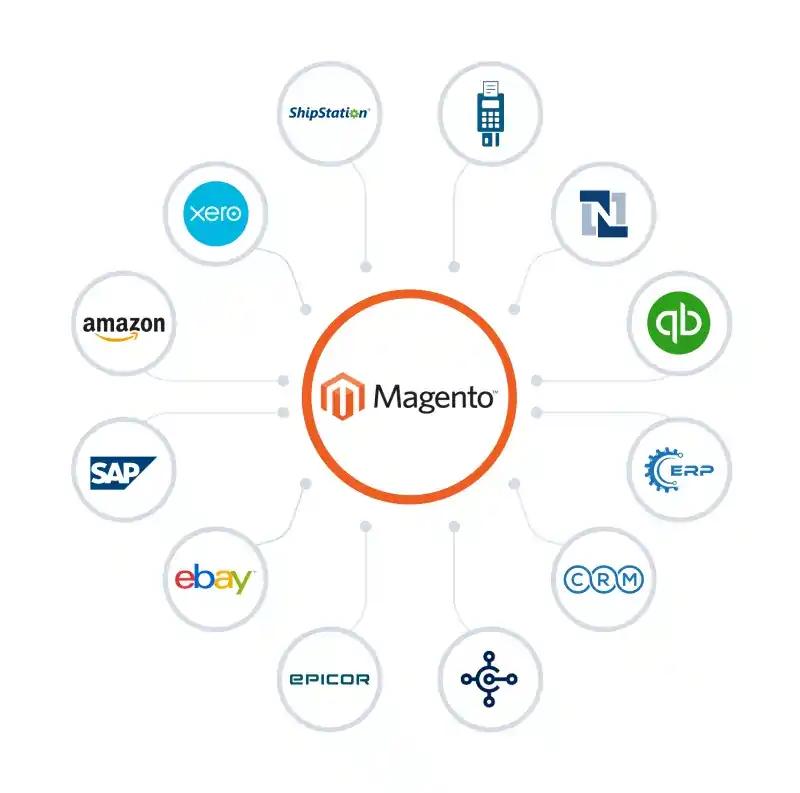
Magento integration involves connecting the platform with external business systems such as ERP, CRM, SAP, payment gateways, shipping carriers, and WMS. By integrating these systems, businesses can streamline operations, connect third-party tools, automate workflows, reduce manual work, and improve customer experiences.
Whether you’re managing a growing online store or a large-scale enterprise operation, Magento integration helps ensure that data flows seamlessly between systems, enabling greater efficiency and better decision-making.
Businesses looking for tailored integration solutions often work with a Magento Development Agency to build scalable and reliable integrations that support long-term growth.
What is Magento Integration?
Magento integration is the process of connecting Magento with external software platforms, applications, and services to enable automatic data exchange.
Instead of manually transferring information between systems, integrations allow data to flow automatically, ensuring consistency and reducing human error.
Typical information exchanged includes:
- Product information
- Inventory levels
- Customer data
- Orders
- Invoices
- Shipping information
- Marketing activity
Magento software integration enables businesses to create a connected ecosystem where every business application works together efficiently.
Why Magento Integration is Important for eCommerce Businesses
1. Improved Operational Efficiency
Manual processes consume valuable time and often result in costly errors. Magento integration automates repetitive tasks such as inventory updates, order processing, and customer management.
Teams can focus on strategic activities rather than administrative work.
2. Better Customer Experience
Customers expect accurate stock information, fast order processing, and real-time delivery updates.
Integrated systems ensure:
- Accurate inventory visibility
- Faster checkout experiences
- Timely shipping updates
- Personalised customer communications
3. Faster Order Processing
When systems communicate automatically, orders can move through fulfilment workflows without delays.
Order Processing Flow
Magento Store → ERP System → Warehouse → Shipping Carrier → Customer
This automation significantly improves operational speed and accuracy.
4. Centralised Data Management
Businesses often use multiple software platforms. Magento integration creates a single source of truth by synchronising information across all connected systems.
This helps eliminate duplicate records and inconsistent reporting.
5. Scalability for Business Growth
As order volumes increase, manual processes become difficult to manage.
Magento integration solutions support growth by automating workflows and reducing operational bottlenecks.
Types of Magento Integrations Businesses Commonly Use
Payment Gateway Integration
Payment gateway integrations allow businesses to securely process online transactions.
Common providers include:
- PayPal
- Stripe
- Worldpay
- SagePay
- Klarna
Benefits include:
- Secure payment processing
- Multiple payment methods
- Reduced cart abandonment
- Enhanced customer trust
ERP Integration
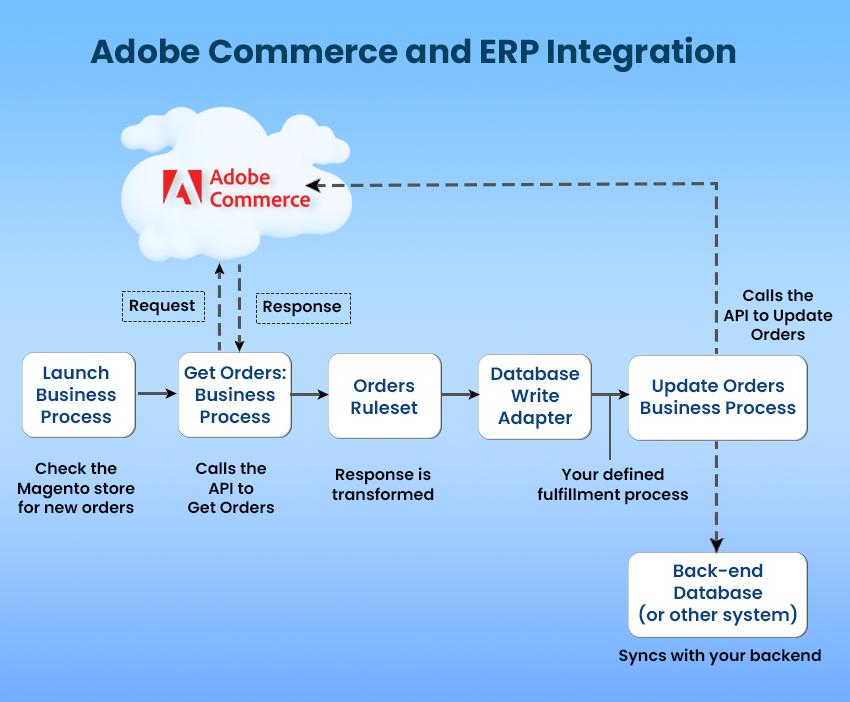
Magento ERP integration connects the store with enterprise resource planning software.
Popular examples include:
- Magento Business Central integration
- Magento NetSuite integration
- Magento integration with SAP
- Microsoft Dynamics integration
ERP systems typically manage:
| Business Function | ERP Role |
| Inventory | Stock management |
| Purchasing | Supplier management |
| Finance | Accounting and reporting |
| Orders | Processing and fulfilment |
| Warehousing | Stock movement |
ERP Integration Flow
Magento Store → ERP System → Inventory Update → Order Processing → Invoice Generation
Complex Magento ERP integrations often require custom workflows and data mapping. Many businesses choose to Hire Magento Developers to ensure seamless ERP connectivity.
CRM Integration
Magento CRM integrations help businesses manage customer relationships more effectively.
Popular CRM platforms include:
- Salesforce
- HubSpot
- Zoho CRM
- Microsoft Dynamics
Benefits include:
- Improved customer segmentation
- Better sales tracking
- Personalised communication
- Enhanced customer retention
Shipping and Logistics Integration
Magento logistics integration connects eCommerce stores with shipping providers and fulfilment partners.
Examples include:
- Royal Mail
- DHL
- DPD
- UPS
- FedEx
Magento fulfilment integration helps automate:
- Shipping label generation
- Delivery tracking
- Returns management
- Shipment notifications
Shipping Workflow
Customer Order → Magento → Warehouse → Carrier → Tracking Number → Customer
Marketing Automation Integration
Marketing automation tools help businesses increase engagement and repeat purchases.
Common examples include:
- Mailchimp Magento integration
- Klaviyo
- Dotdigital
- ActiveCampaign
Magento email integration enables automated campaigns such as:
- Welcome emails
- Abandoned cart recovery
- Product recommendations
- Post-purchase communications
How to Connect with External Business Systems
Businesses can choose several methods depending on complexity, budget, and integration requirements.
| Integration Method | Complexity | Best For |
| Built-In Integration | Low | Standard services |
| Third-Party Extensions | Medium | Faster deployment |
| Custom Modules | High | Unique workflows |
| API Integration | High | Enterprise systems |
| Middleware | High | Multiple integrations |
| Event-Based Integration | Advanced | Real-time communication |
Method 1: Magento Built-in Integration for Payments, Shipping, and Tax
Magento includes native integration capabilities for several commonly used services.
Step-by-step Guide
1. Access the Magento Admin Panel
Navigate to:
Stores → Configuration
2. Configure the Integrations
Enable and configure:
- Payment gateways
- Shipping carriers
- Tax settings
- Security configurations
3. Test the Connection
Verify:
- Successful payments
- Correct tax calculations
- Accurate shipping rates
- Order completion workflows
Method 2: Magento Integration via Third-Party Extensions or Custom Modules
This is one of the most common Magento 2 integration methods.
Step-by-step Guide
1. Define Your Integration Requirements
Identify:
- Systems to connect
- Data to exchange
- Synchronisation frequency
- Security requirements
2. Set Up the Integration Using an Extension or Custom Module
Option 1: Third-Party Extension
Suitable for standard business requirements.
Advantages include:
- Faster deployment
- Lower development costs
- Vendor support
Option 2: Custom Module
Custom Magento integration is ideal when businesses require unique workflows or specialised functionality.
Benefits include:
- Complete flexibility
- Scalability
- Better long-term control
3. Test the Integration
Validate:
- Data accuracy
- Error handling
- Performance
4. Secure and Monitor the Integration
Implement:
- Encryption
- Access controls
- Activity logging
- Monitoring tools
5. Go-Live and Maintain
Monitor performance and apply updates as required.
Method 3: API-Based Integration with Magento (REST & SOAP)
Magento integration API functionality allows businesses to connect virtually any external platform.
Step-by-step Guide
1. Define the Integration Scope
Determine:
- Data objects
- Business rules
- Synchronisation schedules
2. Choose the API Type: REST or SOAP
| API Type | Suitable For |
| REST | Modern applications |
| SOAP | Legacy enterprise systems |
3. Set Up API Credentials in Magento
Create:
- Integration users
- Access tokens
- API permissions
For advanced Magento API integration projects, many businesses utilise Magento API Integration Services to ensure secure implementation and efficient data handling.
4. Make Test API Calls
Validate:
- Authentication
- Data transfer
- Response handling
5. Develop or Configure the External System
Configure mapping and business logic.
6. Schedule or Trigger Synchronisation
Options include:
- Real-time updates
- Scheduled synchronisation
- Event-driven triggers
7. Monitor and Log API Activity
Track:
- Failures
- Performance
- Data consistency
8. Test the Integration End-to-End
Complete testing before production deployment.
API Workflow
Magento → REST API → External System → Data Processing → Magento
Method 4: Integrating with Magento via Middleware
Middleware acts as an intermediary layer between Magento and multiple external systems.
This approach is commonly used when businesses need to connect Magento with ERP, CRM, WMS, and marketing platforms simultaneously.
Step-by-step Guide
1. Clarify Business and Technical Requirements
Identify all systems and required workflows.
2. Select Middleware Type
Popular middleware platforms include:
- MuleSoft
- Boomi
- Celigo
- Azure Integration Services
3. Set Up API Access on Magento
Configure API credentials and permissions.
4. Build and Test API Connectors in Middleware
Create system connections and mappings.
5. Implement Core Middleware Services
Services typically include:
- Data transformation
- Routing
- Validation
- Error handling
Middleware projects often become increasingly complex as businesses scale. Working with a Hire Magento 2 Developer partner can help ensure long-term stability.
6. Set Up Monitoring and Alerts
Configure notifications for failures and delays.
7. Test the Integration End-to-End
Validate every workflow before launch.
Method 5: Event-Based Integration via Webhooks/Message Queue
Event-driven architecture allows systems to communicate in near real time.
Step-by-step Guide
1. Confirm Prerequisites
Ensure all connected systems support event processing.
2. Choose Your Integration Method
Options include:
- Webhooks
- Message queues
- Event subscribers
3. Set Up the Event-Driven Integration Using the Selected Method
Common triggers include:
- Order creation
- Customer registration
- Inventory updates
- Shipment creation
4. Create a Consumer to Process Messages
Configure receiving systems to process incoming events.
5. Test the Integration
Verify successful event delivery and processing.
Event-Based Workflow
Order Created → Webhook Trigger → External System → Processing Complete
Common Magento Integration Challenges
Data Synchronisation Issues
Systems updating at different intervals can create data inconsistencies.
API Limitations
Rate limits and request restrictions can affect performance.
Security Risks
Poorly secured integrations may expose sensitive customer information.
Compatibility Problems
Older extensions may not remain compatible with newer Magento releases.
Best Practices for Magento Integration
Prioritise Security
Use:
- HTTPS encryption
- OAuth authentication
- Access controls
- Regular security reviews
Test Before Deployment
Conduct:
- Functional testing
- Load testing
- User acceptance testing
Monitor Performance
Track:
- API response times
- Failed transactions
- Synchronisation delays
Keep Integrations Updated
Regular maintenance helps ensure compatibility and security.
Many businesses rely on Magento Website Maintenance Services to monitor integrations and keep systems running smoothly.
How to Choose the Right Magento Integration Solution
The best Magento integration solution depends on your business goals, technical requirements, and future growth plans.
| Requirement | Recommended Solution |
| Payment Gateway | Built-in Integration |
| Standard Software | Extension |
| Custom Workflow | Custom Module |
| Enterprise ERP | API Integration |
| Multiple Systems | Middleware |
| Real-Time Data | Event-Based Integration |
Businesses looking for the best Magento integration approach should evaluate scalability, maintenance requirements, security, and long-term support needs before selecting a solution.
Conclusion
Magento integration is a critical component of modern eCommerce operations. Whether you’re implementing Magento ERP integration, Magento CRM integrations, Magento PIM integration, Magento Business Central integration, Magento NetSuite integration, Magento logistics integration, or Magento order fulfilment integration, the right integration strategy can transform business performance.
By connecting Magento with external business systems, retailers can automate processes, improve customer experiences, reduce operational costs, and create a scalable foundation for future growth.

 Ella
Ella