Introduction
WordPress is super popular for making websites, but just putting up a WordPress site doesn’t mean it’ll show up high in Google or other search engines. If you want people to find your site through search results, you need a good SEO plan. This plan should include making sure your site runs fast, writing good content, using the right keywords, organizing your pages well, and making sure visitors have a nice experience on your site. If you’re starting a brand new WordPress website or trying to make your current one better, learning about SEO for WordPress can really help. It’ll make it easier for search engines to look at your pages, figure out what they’re about, and decide to rank them higher in search results.
This WordPress SEO tutorial explains the key steps you can take to optimise your website and follow effective WordPress SEO best practices.
What Is WordPress SEO?
WordPress SEO is the process of optimising a WordPress website so that search engines can better crawl, understand and index its pages. It includes everything from optimising page content and headings to improving website speed, internal linking, mobile usability and technical SEO. WordPress provides many useful features for SEO, but it does not automatically optimise every aspect of your website. You still need to configure your website correctly and create content that satisfies what users are searching for.
A strong WordPress SEO strategy typically includes:
- Keyword research and search intent
- SEO-friendly website structure
- Optimised title tags and meta descriptions
- Useful and original content
- Internal linking
- Image optimisation
- Fast page loading
- Mobile-friendly design
- XML sitemaps
- Schema markup
- Technical SEO
- Backlink building
- Performance monitoring
Why Is SEO Important for WordPress Websites?
Search engines are an important source of traffic for businesses, ecommerce stores, publishers and service providers. A well-optimised WordPress website has a better opportunity to appear when potential customers search for relevant products, services or information.
SEO can help a WordPress website:
- Increase organic search visibility
- Attract relevant visitors
- Generate leads and enquiries
- Improve the user experience
- Build long-term organic traffic
- Support brand visibility
- Reduce reliance on paid advertising
The goal is not simply to achieve a high SEO score in a plugin. Effective SEO focuses on making your website genuinely useful, technically accessible and relevant to the searches you want to rank for.
How to SEO WordPress: Step-by-Step
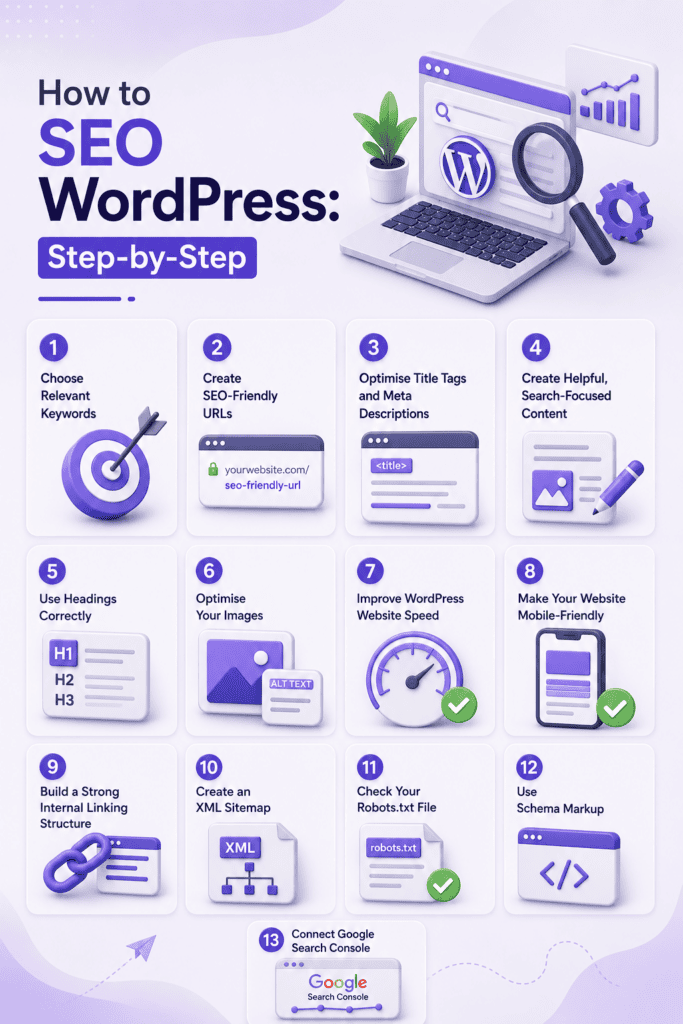
If you’re wondering how to SEO WordPress, start with the fundamentals below. You don’t need to make hundreds of changes at once. Work through the technical and on-page elements systematically.
1. Choose Relevant Keywords
Before optimising your pages, identify the terms your target audience actually searches for.
For example, a Magento development company might target terms such as “Magento development services” or “hire Magento developers”, while an ecommerce store might target product-specific searches.
Use keyword research to identify:
- Primary keywords
- Secondary keywords
- Long-tail keywords
- Related questions
- Search intent
- Topics your competitors are covering
Avoid stuffing the same keyword into a page repeatedly. Instead, use your primary keyword naturally while covering related concepts and questions.
2. Create SEO-Friendly URLs
Your WordPress URLs should be short, descriptive and easy to understand.
For example:
example.com/wordpress-seo-guide/
is generally clearer than:
example.com/?p=12345
You can configure your permalink structure in WordPress under Settings > Permalinks. A descriptive URL helps users and search engines understand what a page is about.
Avoid unnecessarily long URLs, excessive numbers and irrelevant words.
3. Optimise Title Tags and Meta Descriptions
Your title tag is one of the most important on-page SEO elements. It helps search engines understand the topic of a page and can influence whether users click your result.
Create titles that:
- Clearly describe the page
- Include the primary keyword naturally
- Match search intent
- Encourage clicks
- Avoid unnecessary keyword repetition
Your meta description should provide a concise summary of the page and give users a reason to visit it.
SEO plugins such as Rank Math and Yoast SEO make it easier to manage these elements from the WordPress editor.
4. Create Helpful, Search-Focused Content
High-quality content is central to effective SEO for WordPress.
Instead of writing an article simply to include keywords, focus on solving the user’s problem. Understand what someone expects to find when they search for your target term and make sure your page provides a comprehensive answer.
For example, someone searching for “how to SEO WordPress” probably wants practical instructions rather than a basic definition of SEO.
Your content should:
- Answer the main question quickly
- Cover important subtopics
- Use clear headings
- Include relevant examples
- Be easy to scan
- Avoid unnecessary repetition
- Provide genuine value
5. Use Headings Correctly
Use headings to create a logical hierarchy throughout your content.
Your page should generally have one main H1 that describes the topic. H2s can then introduce major sections, while H3s can be used for subsections.
For example:
H1: WordPress SEO Guide
H2: How to SEO WordPress
H3: Optimise Your WordPress URLs
This structure makes longer content easier for both readers and search engines to understand.
6. Optimise Your Images
Large, unoptimised images can slow down a WordPress website and negatively affect the user experience.
Before uploading images, consider:
- Compressing large files
- Using appropriate image formats
- Giving images descriptive file names
- Adding useful alt text where appropriate
- Using responsive image sizes
- Avoiding unnecessarily large dimensions
Alt text should describe the image when the description provides useful information. Don’t use alt text simply as a place to insert keywords.
7. Improve WordPress Website Speed
Website performance is an important part of technical SEO and user experience.
A slow website can frustrate visitors, particularly on mobile devices. To improve WordPress performance, you can:
- Compress images
- Reduce unnecessary plugins
- Use caching
- Minimise unnecessary scripts
- Use a reliable hosting provider
- Optimise your database
- Use a content delivery network where appropriate
- Keep WordPress, themes and plugins updated
Tools such as Google’s PageSpeed Insights can help identify performance issues that need attention.
8. Make Your Website Mobile-Friendly
Your website should work properly across smartphones, tablets and desktop devices.
A responsive WordPress theme can provide a strong starting point, but don’t assume that a responsive design automatically means the website is fully optimised.
Check your site on different screen sizes and make sure:
- Text is easy to read
- Buttons are easy to tap
- Navigation works properly
- Images fit the screen
- Important content isn’t hidden
- Pages load efficiently
9. Build a Strong Internal Linking Structure
Internal links connect pages within your website and help users discover related content.
They can also help search engines understand the relationship between different pages and distribute authority throughout your website.
For example, a blog about WordPress SEO could naturally link to a relevant WordPress development service page, while an article about ecommerce SEO could link to an ecommerce development service.
Use descriptive anchor text that tells users what they can expect after clicking the link.
10. Create an XML Sitemap
An XML sitemap provides search engines with information about the important URLs on your website.
Most established WordPress SEO plugins can automatically generate and update an XML sitemap. Once your website is ready, submit the sitemap through Google Search Console so that Google can discover your pages more efficiently.
A sitemap doesn’t guarantee that every URL will be indexed, but it can make URL discovery easier.
11. Check Your Robots.txt File
The robots.txt file provides instructions to search engine crawlers about which areas of a website they should or shouldn’t crawl.
Be careful when changing it. Accidentally blocking important resources or pages can create SEO problems.
Before making changes, understand exactly what the directive does and check that important pages remain accessible to search engines.
12. Use Schema Markup
Schema markup provides structured information about the content of a page. Depending on the page type, structured data can help search engines understand information such as articles, products, organisations, services and FAQs.
However, schema should accurately represent the visible content on the page. Adding irrelevant or misleading structured data simply to try to gain search features is not a good SEO practice.
13. Connect Google Search Console
Google Search Console is an essential tool for monitoring organic search performance.
Once your WordPress website is connected, you can use it to monitor:
- Search queries
- Clicks
- Impressions
- Average search position
- Indexing issues
- Sitemap status
- Search enhancements
- Technical problems
Regularly reviewing Search Console can help you identify pages that are gaining visibility and areas that need further optimisation.
Best WordPress SEO Plugins
Plugins can simplify many SEO tasks, but a plugin cannot replace a complete SEO strategy.
Rank Math
Rank Math provides tools for managing titles, meta descriptions, XML sitemaps, schema and other SEO settings from within WordPress. Its analysis features can also provide recommendations while creating or editing content.
Yoast SEO
Yoast SEO is another widely used WordPress SEO plugin. It provides features for managing metadata, XML sitemaps, canonical URLs and content optimisation.
All in One SEO
All in One SEO provides a range of on-page and technical SEO features, including metadata management, sitemaps and schema-related functionality.
The best plugin depends on your website’s requirements. More plugins do not necessarily mean better SEO, so choose a solution that provides the features you actually need.
WordPress SEO Best Practices
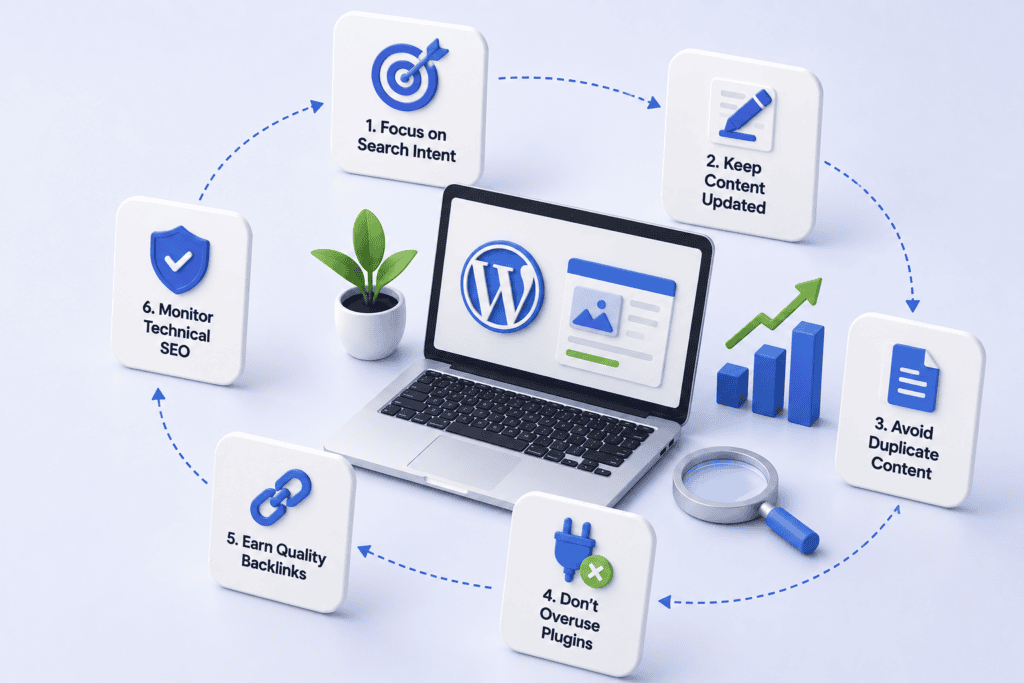
Following a consistent set of WordPress SEO best practices can help keep your website technically healthy while improving its content and usability.
Focus on Search Intent
Understand why someone is searching for a keyword before creating or optimising a page. A page that matches search intent is more useful than one that simply repeats a keyword.
Keep Content Updated
Review important content periodically and update outdated information, statistics, links and recommendations where necessary.
Avoid Duplicate Content
Where multiple URLs contain substantially similar content, review whether they are necessary. Use appropriate canonicalisation and redirects where required.
Don’t Overuse Plugins
Installing too many plugins can introduce unnecessary code, security risks and performance issues. Only use plugins that serve a genuine purpose.
Earn Quality Backlinks
Backlinks from relevant and reputable websites can support your site’s authority. Focus on creating useful content and building legitimate relationships rather than pursuing large numbers of low-quality links.
Monitor Technical SEO
Regularly check for broken links, indexing problems, crawl issues, redirect errors and performance problems. Fixing technical issues is an ongoing part of maintaining a healthy website.
How to Improve SEO Score on WordPress
If you’re wondering how to improve SEO score on WordPress, don’t focus exclusively on the score displayed by your SEO plugin.
SEO plugins typically use their own checklists to assess elements such as keyword placement, title length, headings, links and content structure. These recommendations can be useful, but a page scoring 100/100 isn’t automatically going to outrank another page.
Instead, improve the areas that genuinely affect your website’s quality and search visibility.
Start by:
- Choosing a relevant target keyword.
- Matching your content to search intent.
- Writing a useful and comprehensive page.
- Optimising the title and meta description.
- Creating a clear heading structure.
- Improving internal linking.
- Optimising images and page speed.
- Making the website mobile-friendly.
- Fixing indexing and technical issues.
- Monitoring performance through Google Search Console.
Think of an SEO score as a checklist rather than a ranking guarantee.
Common WordPress SEO Mistakes to Avoid
Even technically well-built WordPress websites can struggle when basic SEO principles are overlooked.
Some common mistakes include:
- Keyword stuffing
- Publishing thin or unhelpful content
- Using duplicate page titles
- Ignoring mobile usability
- Uploading huge image files
- Creating complicated website structures
- Using generic anchor text everywhere
- Blocking important pages through robots.txt
- Installing unnecessary plugins
- Ignoring broken links and redirects
- Chasing plugin scores instead of user intent
- Publishing content without monitoring its performance
Avoiding these issues gives your website a stronger foundation for long-term organic growth.
WordPress SEO Checklist
Before publishing a new WordPress page, use this quick checklist:
- Choose a relevant primary keyword
- Match the page to search intent
- Write a descriptive SEO title
- Create a useful meta description
- Use a short, descriptive URL
- Add a clear H1
- Organise content with H2 and H3 headings
- Optimise images
- Add relevant internal links
- Check mobile usability
- Check page speed
- Review indexing settings
- Add relevant schema where appropriate
- Proofread and update the content
- Monitor performance after publication
Final Thoughts
Getting WordPress to rank well in search engines isn’t just about putting in an SEO plugin or getting a perfect score on an optimisation tool. Real success comes from mixing together helpful content that people actually want to read, making sure your website’s technical stuff works right, organising your site in a smart way, keeping your pages loading fast, and making sure visitors have a good time when they’re on your site.
If you’re building a new WordPress website or an existing site needs a more advanced SEO foundation, working with an experienced WordPress development team can help ensure that performance, structure and functionality support your wider search strategy from the beginning.


 Tom
Tom