What Is llms.txt And What It Is Not {#what-is-llms-txt}
LLMs.txt is a plain-text Markdown file that you place at the root of your website, accessible at yourdomain.com/llms.txt. Its purpose is to help AI language models like ChatGPT, Claude, Perplexity, and Gemini quickly understand what your website is about and where your most important content lives.
It was proposed in September 2024 by Jeremy Howard, co-founder of Answer.AI, and has since been adopted by major companies, including Anthropic, Cloudflare, Stripe, and Vercel.
Here is the key thing to understand: llms.txt is not a blocking or permission file. It does not block AI bots from crawling your site. It does not use Disallow: or Allow: rules. That is what robots.txt is for.
Think of llms.txt as a curated reading list for AI. It points AI systems directly to your best pages, your guides, documentation, product information, and FAQs so they can understand your brand accurately, without having to parse through navigation menus, cookie banners, JavaScript, and marketing copy to find the useful content.
A simple way to think about the difference between the three main web files:
- robots.txt tells search engine crawlers what they can and cannot access
- sitemap.xml lists every page on your website for indexing
- llms.txt is a hand-picked, AI-friendly summary pointing to your most valuable content
How llms.txt Differs from robots.txt {#how-it-differs}
This is where a lot of guides get it wrong, including many published in 2024 and early 2025.
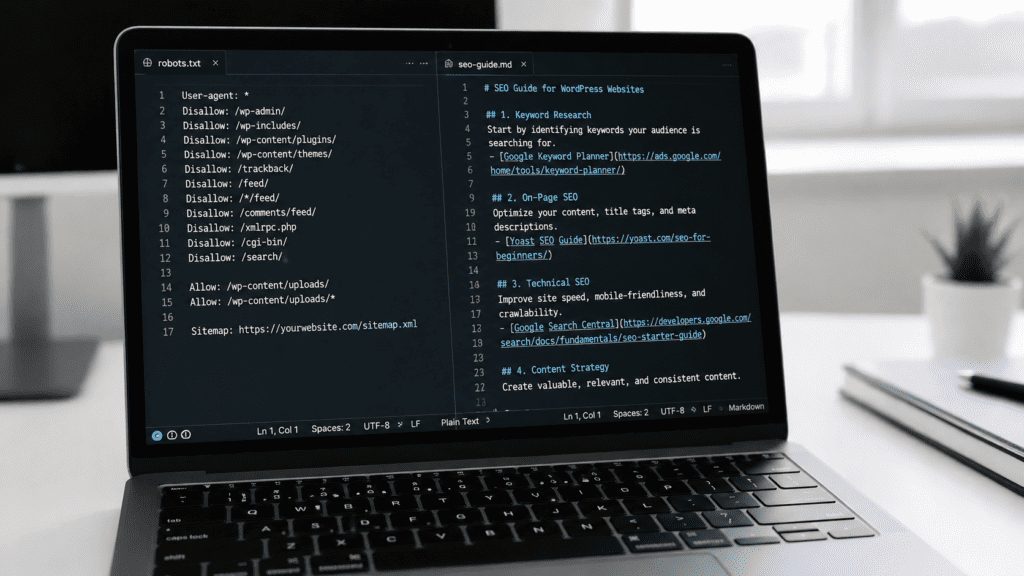
Robots.txt uses a specific syntax:
User-agent: GPTBot
Disallow: /checkout/
Allow: /blog/
llms.txt uses Markdown, not this syntax at all. It is a human-readable document structured with headings and links, not a list of crawling rules.
If you want to block AI bots from crawling certain parts of your website, you should do that in your robots.txt file using the appropriate bot names (e.g., GPTBot for OpenAI, ClaudeBot for Anthropic). The llms.txt file serves a completely different purpose.
Why Should eCommerce Businesses Care? {#why-it-matters}
AI tools are increasingly how people discover products and businesses. When someone asks ChatGPT, “What are the best Shopify development agencies in the UK?” or asks Perplexity to “find me a Magento developer,” those tools pull information from the web in real time. Without clear, structured information to reference, AI systems often guess, and they guess wrong.
Note: The research is unambiguous: as of 2026, no major consumer AI search engine has publicly confirmed that it consumes llms.txt to answer user questions, including ChatGPT search, Perplexity, Google AI Overviews, Gemini, Copilot, and Claude.ai search.
An llms.txt file gives you direct input over how AI tools understand your business. Some practical reasons to implement it:
Better accuracy in AI-generated answers:
When AI tools have a clean, structured file pointing to your services, products, and key pages, they are far less likely to serve outdated or incorrect information about your brand.
Faster context for AI agents:
Modern websites are full of clutter that makes them hard for AI systems to parse quickly. A Markdown file with links to your most important content removes that friction entirely.
A low-effort, forward-looking investment:
The file takes minutes to create. As AI-driven discovery continues to grow as a traffic source, having this in place early puts you ahead.
It is worth being honest here: as of 2026, not every major AI platform has officially confirmed that they actively read llms.txt files. But adoption is growing rapidly; over 844,000 websites have implemented it, Anthropic’s own documentation site uses it, and it is fast becoming standard practice for any business that takes AI visibility seriously.
The Correct llms.txt Format (With Examples) {#correct-format}

The llms.txt file must be written in Markdown. The structure follows this pattern:
# Your Site or Brand Name
> A short description of what your website or business does.
Optional additional context about your business or content.
## Section Name (e.g. Services, Blog, Documentation)
– [Page Title](https://yourdomain.com/page): A short description of what this page covers.
– [Another Page](https://yourdomain.com/another-page): What this page is about.
## Optional
– [Less critical page](https://yourdomain.com/optional-page): AI can skip this if context is limited.
Required element: The H1 heading (# Your Site Name) is the only required element.
The “Optional” section has a special meaning in the specification links placed under a heading named ## Optional can be skipped by AI systems if they are working with limited context windows.
Here is a real-world example for an eCommerce agency:
markdown
# Kiwi Commerce
> Kiwi Commerce is a full-service eCommerce agency based in the UK,
> specialising in Magento, Shopify, Hyva, and WordPress development
> for ambitious brands.
We help online retailers build, optimise, and scale high-performance stores. Our team covers development, UX design, migration, and digital marketing.
## Services
– [Magento Development](https://kiwicommerce.co.uk/magento-development/): Custom Magento builds, upgrades, and integrations.
– [Shopify Development](https://kiwicommerce.co.uk/shopify-development-agency/): Shopify store builds, app integrations, and theme work.
– [Hyva Theme Development](https://kiwicommerce.co.uk/services/hyva-themes-development/): Hyva frontend builds for Magento stores.
– [Replatforming & Migration](https://kiwicommerce.co.uk/services/replatforming-and-migration/): Moving between platforms with minimal disruption.
## Blog & Guides
– [Blog](https://kiwicommerce.co.uk/blog/): Practical guides on eCommerce development, SEO, and platform tips.
## Optional
– [Case Studies](https://kiwicommerce.co.uk/casestudies/): Examples of work completed for clients.
– [About Us](https://kiwicommerce.co.uk/about-us/): Background on the Kiwi Commerce team.
Notice: no User-agent, Disallow, or Allow rules anywhere. Those belong in robots.txt.
How to Add llms.txt to WordPress {#wordpress}
Option 1: Manual (via FTP or File Manager)
- Create a new plain text file on your computer and name it llms.txt.
- Write your content in Markdown format (see the example above).
- Connect to your server via FTP (using a client like FileZilla) or use your hosting panel’s File Manager.
- Upload the file to your site’s root directory in the same folder where wp-config.php lives, typically /public_html/.
- Verify it is live by visiting https://yourdomain.com/llms.txt in your browser.
Option 2: Free Plugin
If you would rather not work with files directly, the “Website LLMs.txt” plugin (available free on WordPress.org) handles file generation and management from within your WordPress dashboard. It lets you choose which post types and pages to include, and it generates a properly formatted Markdown file automatically. It is completely free and has been well-reviewed by the community.
Another solid free option is the “LLMs.txt and LLMs-Full.txt Generator” plugin, also on WordPress.org, which generates both the summary llms.txt and a comprehensive llms-full.txt in one go.
Kiwi Commerce tip: If you already use Yoast SEO, it has a basic llms.txt feature built in, though it generates a fairly minimal file. The dedicated plugins above give you more control over what is included.
How to Add llms.txt to Shopify {#shopify}

Shopify does not give you direct access to your domain root, so placing a file at yourdomain.com/llms.txt requires a workaround. Here is the correct method:
Step 1: Create your llms.txt file
Write your Markdown content following the format shown above. Save it as llms.txt on your computer.
Step 2: Upload to Shopify’s CDN
- In your Shopify admin, go to Content → Files.
- Click Upload files and upload your llms.txt.
- Once uploaded, copy the CDN URL that Shopify provides it will look something like https://cdn.shopify.com/s/files/….
Step 3: Create a URL Redirect
Since AI bots look specifically at yourdomain.com/llms.txt, you need to redirect that URL to the CDN location.
- Go to Online Store → Navigation.
- Click View URL Redirects.
- Click Create URL Redirect.
- Set the redirect from /llms.txt to the CDN URL you copied in Step 2.
- Save the redirect.
Step 4: Verify
Visit https://yourdomain.com/llms.txt in your browser. You should see your Markdown content load correctly.
Important note: The Shopify Assets folder method (placing a file in Online Store → Themes → Edit Code → Assets) does not work for this purpose. Files in the Assets folder are served from /assets/llms.txt, not from the root path where AI bots look for it. Always use the redirect method described above.
Kiwi Commerce tip: If you need help with the Shopify setup or want to take things further with a full Shopify build or optimisation our Shopify development team is happy to assist.
How to Add llms.txt to Magento {#magento}

- Connect to your server via FTP or SSH.
- Navigate to your Magento root directory the folder containing index.php, app/, and pub/.
- Create a new file named llms.txt in that root directory.
- Write your Markdown content listing your key category pages, product ranges, support pages, and guides.
- Upload and verify it is accessible at https://yourdomain.com/llms.txt.
Example for a Magento store:
markdown
# Your Store Name
> We sell “product category” online. Based in “location”, we ship across the UK and Europe.
## Products
– [Full Product Catalogue](https://yourdomain.com/catalog/): Browse all product categories.
– [New Arrivals](https://yourdomain.com/new/): Recently added products.
## Customer Information
– [Shipping Policy](https://yourdomain.com/shipping): Delivery times and costs.
– [Returns Policy](https://yourdomain.com/returns): How to return an order.
– [FAQ](https://yourdomain.com/faq): Common questions answered.
## Optional
– [About Us](https://yourdomain.com/about-us): Our story and values.
Kiwi Commerce tip: Make sure your Magento server configuration serves .txt files correctly. Most setups do by default, but if the file returns a 404, check your .htaccess or Nginx config.
How to Add llms.txt to Custom-Built Websites {#custom}
For sites built with PHP, Node.js, React, or any other stack:
- Create your llms.txt Markdown file.
- Place it in your web root the directory from which your server serves files publicly (e.g. /var/www/html/, /public/, /dist/).
- Deploy to your live server and verify at https://yourdomain.com/llms.txt.
For static sites, simply add the file to your build output folder before deploying.
For server-side applications, you can also serve the file programmatically by adding a route that returns the Markdown content with a text/plain content type:
Node.js / Express example:
javascript
app.get(‘/llms.txt’, (req, res) => {
res.type(‘text/plain’);
res.sendFile(path.join(__dirname, ‘public’, ‘llms.txt’));
});
Kiwi Commerce tip: For Apache servers, confirm your mime.types config includes text/plain for .txt files. For Nginx, this is handled automatically in most default configurations.
llms.txt Best Practices {#best-practices}
Keep it curated, not exhaustive:
llms.txt is not a sitemap. You do not need to list every URL on your site, only the pages that give AI tools an accurate picture of who you are and what you offer. Quality beats quantity here.
Write short, accurate descriptions for each link:
One sentence is enough. Think of it as a label that tells the AI what it will find if it follows that link. “Our full product catalogue with over 500 items across five categories” is more useful than just linking to /catalogue/ with no description.
Point to Markdown versions where possible:
If your blog posts or documentation pages are available as .md files or can be served with a .md extension, link to those versions. Markdown is far easier for AI systems to parse than HTML.
Keep it updated:
An llms.txt file with broken links or references to discontinued pages actively harms AI understanding. Update it when you add new key pages or retire old ones.
Do not duplicate your sitemap:
If your llms.txt lists every page, it adds no value over your sitemap. Use the “Optional” section for content that is useful but not critical, and keep the main sections focused on your most important pages.
Use the correct Markdown format:
The file must follow the specification H1 for site name, blockquote for description, H2 headers for sections, and Markdown list items for links. Anything else may not parse correctly.
Does llms.txt Help SEO? {#seo}
Not directly. llms.txt has no effect on Google’s crawling or ranking algorithms. It does not replace traditional SEO. Google’s documentation update in June 2026 states that llms.txt has no positive or negative effect on Search rankings or AI Overviews. Google simply ignores the file.
What it does do is help with AI visibility, sometimes called Generative Engine Optimisation (GEO) or Answer Engine Optimisation (AEO). As more users turn to AI tools to answer questions and find products, having clear, structured information for those tools to reference becomes increasingly valuable.
Think of traditional SEO and llms.txt as two separate layers. Your SEO efforts help you rank in Google. Your llms.txt helps AI tools cite you accurately when users ask questions your content answers.
Final Thoughts
llms.txt is a simple, low-effort file, but it needs to be set up correctly to be useful. The most important things to remember:
- It is a Markdown file, not a robots.txt-style permission file.
- Its purpose is to guide AI toward your best content, not to block anything.
- On Shopify, the Assets folder method does not work; use the CDN redirect method instead.
- On WordPress, free plugins make the process straightforward.
- Keep the file curated and updated rather than trying to list everything.
Where llms.txt does work:
The most useful input from current research. The same file that performs absolutely nothing for ChatGPT search citations is doing meaningful work in the agentic web where AI agents fetch context, pick tools, and complete jobs. Developer tools like Cursor, Windsurf, Claude Code, GitHub Copilot and Cline all scan for /llms.txt when pointed at a documentation page. The usefulness of llms.txt nowadays is in agent frameworks, RAG pipelines, MCP integrations, not consumer chatbots.
If you need help with your Shopify store, Magento setup, or broader eCommerce development, the team at Kiwi Commerce is happy to take a look. We work across Magento, Shopify, Hyva, and WordPress to get in touch for a conversation about your project.

 Ella
Ella