Introduction
When building a website, the platform you choose can shape everything from how your site looks to how easily it grows with your business. It’s not just about getting online; it’s about choosing something that works for you long term.
Squarespace and WordPress are two of the most popular options, but they’re built with different users in mind. In this guide, we’ll walk through a clear squarespace vs wordpress comparison to help you decide which platform suits your needs.
What is Squarespace?
Squarespace is an all-in-one website builder designed for simplicity. It combines design, hosting, and basic functionality into a single platform, so you don’t need to manage separate tools.
You can choose from professionally designed website templates, customise them using a visual editor, and publish your site without any technical setup. It also includes built-in SEO tools and eCommerce features, which make it a convenient choice for small businesses and individuals.
For anyone looking for a straightforward website builder with minimal effort, Squarespace is often a good starting point.
What is WordPress?
WordPress is a flexible CMS platform that gives you full control over your website. Unlike Squarespace, it requires you to set up your own website hosting and manage different components such as themes and plugins.
That extra setup comes with a major advantage: flexibility. With thousands of WordPress plugins and customisation options available, you can build anything from a simple blog to a complex eCommerce store.
Many businesses choose to work with a WordPress development agency
to get the most out of the platform and ensure everything is set up properly.
Squarespace vs WordPress: Quick Comparison
| Feature | Squarespace | WordPress |
| Ease of use | Very easy | Moderate |
| Flexibility | Limited | Very high |
| Plugins | Limited | Extensive |
| eCommerce | Good for small stores | Scalable |
| SEO | Basic tools | Advanced control |
| Hosting | Included | Separate |
Squarespace vs WordPress: Which is Better?
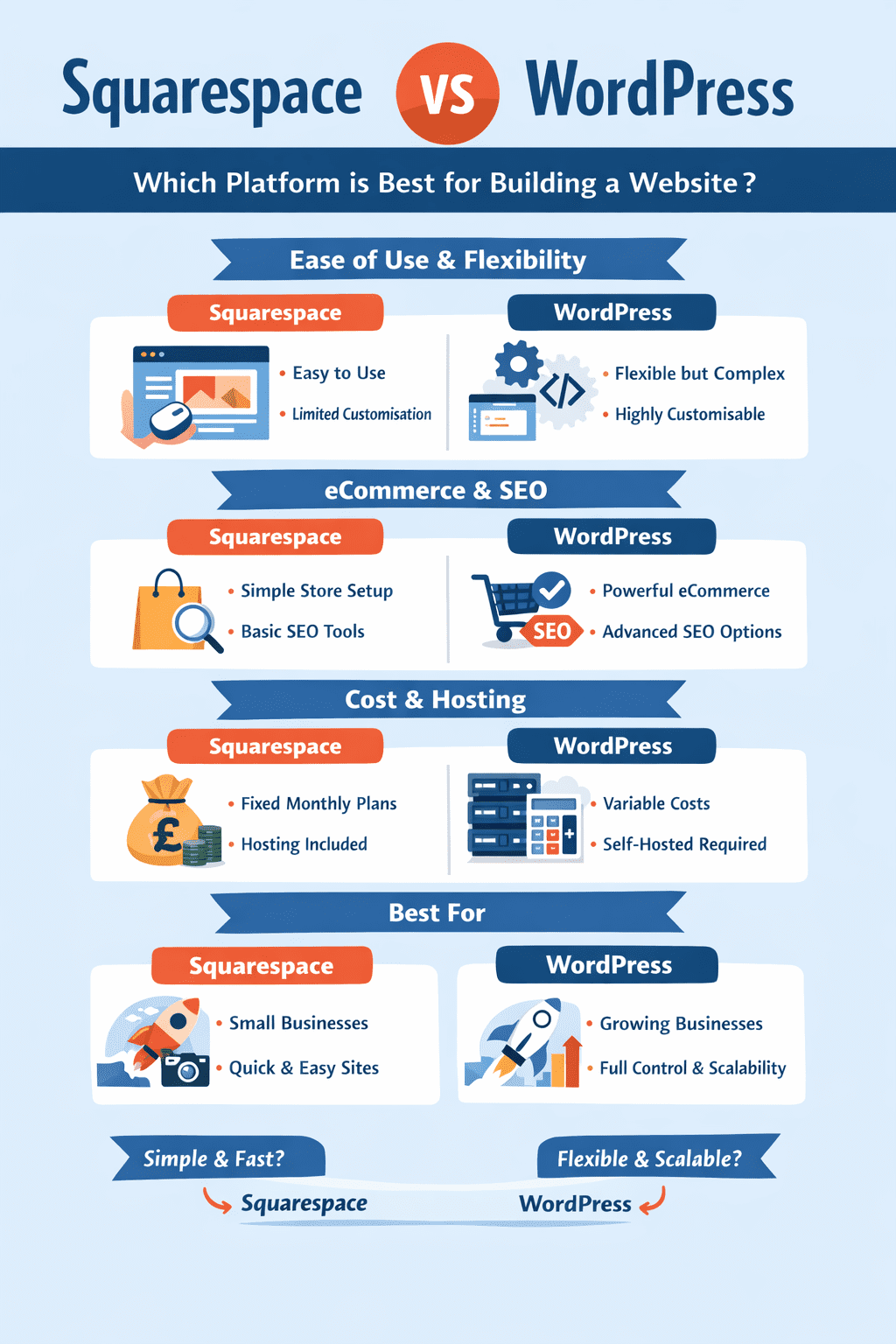
There isn’t a single winner here; it depends on what you need. Squarespace focuses on simplicity and speed, while WordPress offers more control and long-term flexibility.
Ease of Use
Squarespace is designed to be user-friendly. You can build a site by simply selecting a template and editing content on the page. There’s no need to worry about installation or updates.
WordPress takes a bit more effort to get started. You’ll need to set up hosting, install themes, and configure plugins. However, once everything is in place, it gives you much more control over how your site works.
Customisation and Design
Squarespace templates are polished and modern, which is one of its biggest strengths. They’re ideal if you want a professional-looking website quickly.
WordPress, however, gives you far more freedom. You’re not limited to a fixed structure, and you can customise every detail. Businesses that want something unique often work with a
Development & Integration Company
to build tailored solutions.
This flexibility is a key difference when comparing WordPress vs Squarespace features.
Plugins and Integrations
Squarespace includes built-in tools for most basic needs, but it doesn’t offer the same level of integration as WordPress.
WordPress has a large ecosystem of plugins that extend functionality. Whether you need advanced SEO tools, analytics, or third-party integrations, there’s usually a plugin available.
This is one of the main reasons why WordPress is often preferred for more complex websites.
eCommerce Capabilities
When looking at WordPress vs Squarespace ecommerce, both platforms can support online selling, but they cater to different levels.
Squarespace is well-suited for smaller stores with simple product ranges. It’s easy to manage and doesn’t require much setup.
WordPress, particularly with WooCommerce, is built for scalability. It offers greater flexibility in managing products, payments, and shipping. For growing businesses, WordPress vs Squarespace for ecommerce typically leans towards WordPress.
SEO Capabilities
The comparison of Squarespace vs WordPress seo often comes down to control.
Squarespace provides the essential SEO tools needed to optimise pages, which works well for smaller websites.
WordPress allows for deeper optimisation. From custom URLs to advanced plugins, it gives businesses more control over how their site performs in search engines.
Data Ownership
With Squarespace, your website is hosted within their platform. While this makes things easier, it also limits how much control you have over your data.
WordPress gives you full ownership. You control your files, database, and hosting, which is important if you plan to scale or move your site in the future.
Pricing
When comparing WordPress vs Squarespace cost, Squarespace offers a clear structure with fixed monthly pricing plans that include hosting.
WordPress costs can vary. You’ll need to factor in hosting, themes, plugins, and any development work. While it can start affordable, costs can increase depending on your requirements.
Hosting
Squarespace includes hosting as part of its service, so everything is managed in one place.
With WordPress, you’ll need to arrange your own hosting. This adds an extra step, but also gives you more control over performance and scalability. This difference is central to WordPress vs Squarespace hosting.
Blogging Features
For content-driven websites, Squarespace vs WordPress for blogging is an important consideration.
Squarespace offers a clean and simple blogging experience, which is suitable for basic publishing.
WordPress was originally built as a blogging platform, so it offers more advanced features for managing and organising content.
Security
In terms of Squarespace vs WordPress security, Squarespace handles security and updates for you, which reduces maintenance.
WordPress requires more involvement, but with proper setup and regular updates, it can be just as secure.
Squarespace vs WordPress: Pros and Cons
When reviewing Squarespace vs WordPress Pros and Cons, the key differences become clear.
Squarespace is easier to use and quicker to launch, making it ideal for beginners. However, it can feel restrictive as your needs grow.
WordPress offers far greater flexibility and scalability, but it requires more setup and ongoing management.
When to Choose Squarespace
Squarespace is a good choice if you want something quick and easy to manage. It’s ideal for small websites where you don’t want to deal with setup, hosting, or ongoing maintenance.
Everything is built in, so you can pick a template, add your content, and get your site live without much effort. It works well for brochure sites, portfolios, or smaller online shops where the requirements are fairly simple.
When to Choose WordPress
WordPress is a better fit if you need more flexibility and plan to grow your website over time. It gives you full control over design, features, and performance, which is useful for businesses with more specific requirements.
It does take a bit more setup, but the benefit is that you’re not limited as your site grows. If you need custom functionality or integrations, WordPress is usually the stronger option.
Working with a UX & UI Design Agency can also help make sure the site is easy to use and built with your customers in mind.
Squarespace vs WordPress: Which is Better for You?
If you want something simple and quick to launch, Squarespace is the easier option.
If you’re thinking long-term and want more control, WordPress is usually the better choice.
It really comes down to how much flexibility you need now and how much you might need later.
Final Verdict
In this Squarespace vs WordPress comparison, both platforms have their strengths.
Squarespace is ideal for quick, hassle-free websites, while WordPress is better for building something more flexible and scalable over time.
It’s also worth thinking ahead. As businesses grow, platform needs can change. For example, migration from Squarespace to Shopify in 1 hour is now achievable with the right tools, including Squarespace to Shopify migration covering products, content, and store setup.
Whether you’re migrating a Squarespace store to Shopify or planning future upgrades, understanding the full journey from pre-migration to post-migration steps can make the transition much smoother.

 Sam
Sam