Introduction
Email remains one of the most effective ways to connect with customers in e-commerce. Whether you want to promote a new product, recover abandoned carts, or simply keep customers informed about their orders, email on Shopify plays a crucial role in building long-term relationships.
For Shopify store owners, email marketing is not just about sending promotional messages. It helps nurture leads, improve customer retention, and drive measurable ROI. With the right strategy, tools, and Shopify apps email integrations, you can run effective email campaigns, automate transactional emails, and maintain excellent deliverability.
Shopify makes it easy to email customers on Shopify, manage a Shopify email list, and track performance through built-in analytics or third-party tools. Many businesses also rely on the Shopify email feature or specialised best email marketing for Shopify tools to reach their audience efficiently.
If you are working with a professional Shopify web agency or a trusted Digital Marketing Agency, your email marketing strategy can become even more powerful. These experts can help set up advanced automation, improve deliverability, and optimise campaigns to maximise revenue.
In this guide, we will walk through the steps to email customers on Shopify, best practices to follow, and tools that can help you build an effective Shopify email marketing strategy.
How to Email Customers on Shopify?
Sending emails directly from Shopify is straightforward. You can reach out to individual customers or segments of your audience using Shopify’s built-in tools.
1. Select Customers
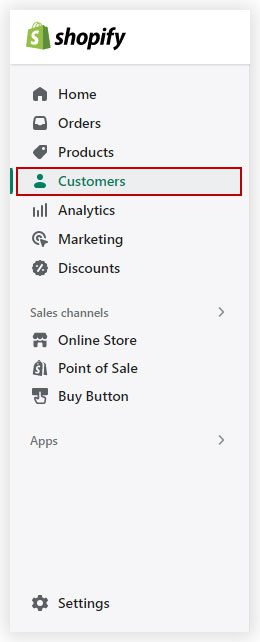
Start by navigating to the Customers section in your Shopify admin.
Here you can:
- View your entire Shopify email list
- Filter customers based on behaviour
- Segment audiences for targeted email campaigns
For example, you can create groups such as:
- Customers who purchased in the last 30 days
- Customers who abandoned carts
- VIP repeat buyers
Segmenting your audience helps improve engagement and increases your email marketing ROI.
2. Select the Email IDs
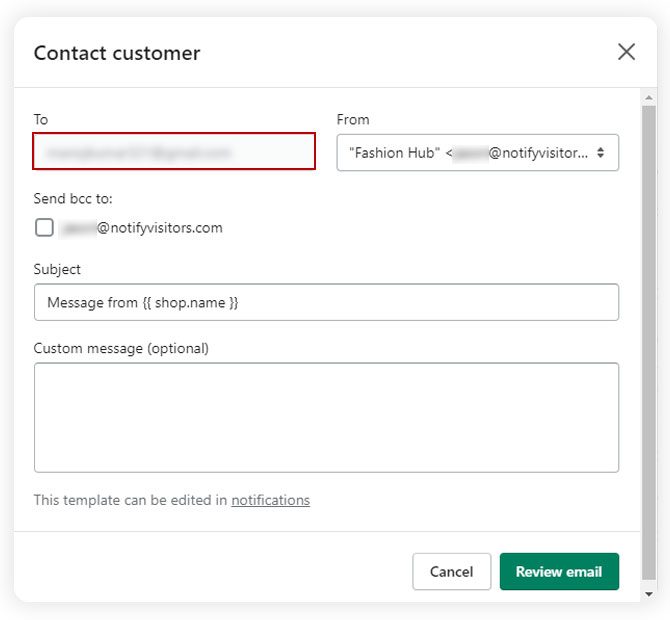
Once you have filtered the customer group, Shopify will show the list of email addresses associated with those accounts.
You can then:
- Select individual email contacts
- Choose a full customer segment
- Export or import contacts if required
This step ensures you send the right message to the right customers.
3. Update the Subject Line
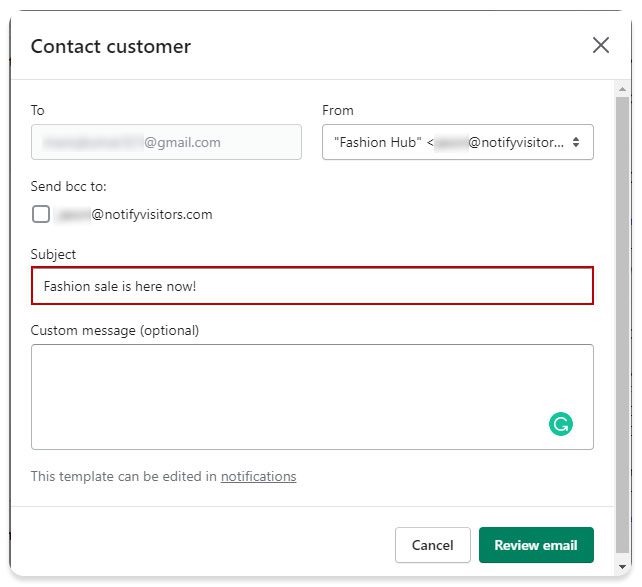
The subject line is one of the most important parts of any Shopify email marketing campaign.
Tips for effective subject lines:
- Keep them short and clear
- Add urgency or curiosity
- Personalise where possible
Example subject lines:
- “Your 10% Discount is Waiting”
- “ABC, Your Order Update is Here”
- “Exclusive Offer for Our Best Customers”
A strong subject line improves open rates and helps your email campaigns perform better.
4. Write Your Email Message
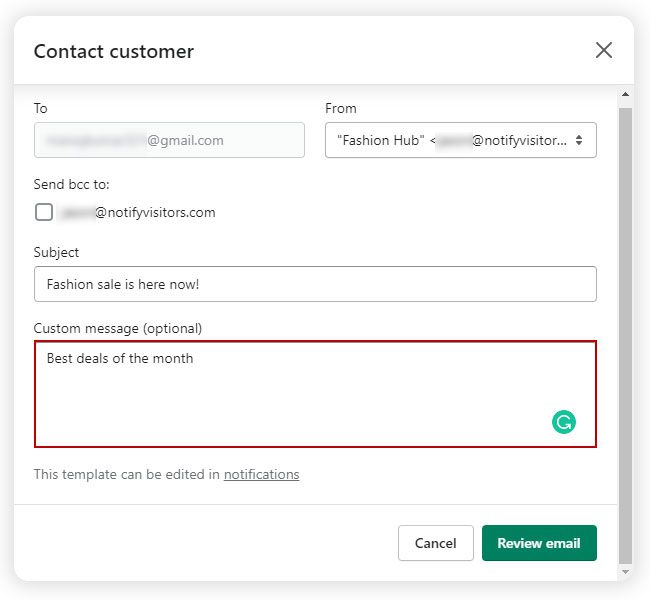
Now it is time to craft your message.
Your email should include:
- A clear purpose
- Personalised content
- A strong call-to-action
For example:
- Product launch announcements
- Promotions and discount codes
- Restock notifications
- Newsletters and updates
Many store owners use Shopify apps email tools to create visually appealing templates.
5. Review Email
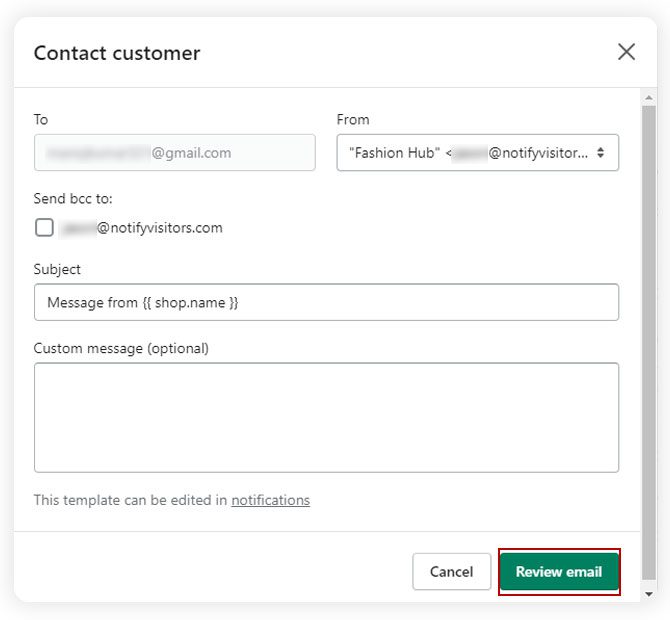
Before sending your message, review everything carefully.
Check for:
- Spelling and grammar
- Broken links
- Mobile responsiveness
- Correct customer segment
Previewing emails helps ensure professional communication and avoids costly mistakes.
6. Send the Email
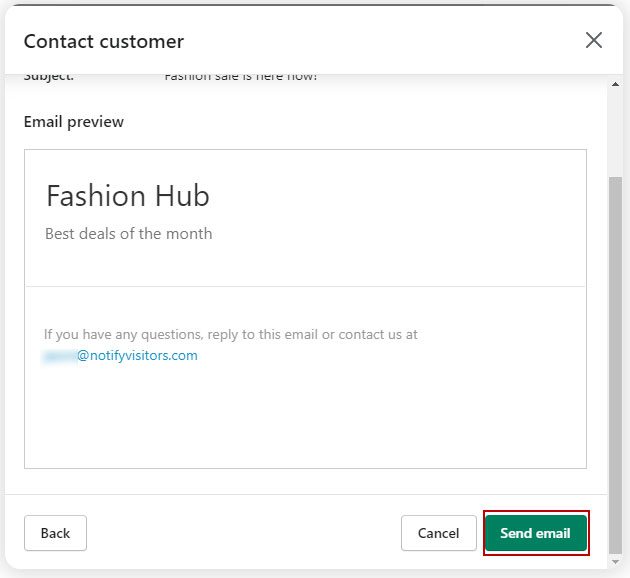
Once everything looks good, you can send your email campaign immediately or schedule it for later.
Scheduling allows you to:
- Send emails during peak engagement times
- Plan campaigns in advance
- Maintain consistent communication with customers
Best Practises for Emailing Customers on Shopify
1. Personalise Your Emails for Better Engagement
Personalisation improves engagement and conversion rates.
You can personalise emails using:
- Customer names
- Purchase history
- Location data
- Browsing behaviour
Personalised email campaigns feel more relevant and increase customer loyalty.
2. Avoid Spam Filters and Improve Deliverability
Email deliverability determines whether your message reaches the inbox.
Best practices include:
- Avoid excessive promotional language
- Maintain a clean Shopify email list
- Use verified business email and Shopify addresses
- Authenticate your domain
These steps help maintain a good sender reputation.
3. Stay Compliant with Email Marketing Laws (CAN-SPAM, GDPR, etc.)
Compliance is essential when sending marketing emails.
Make sure to:
- Obtain customer consent
- Provide an unsubscribe option
- Clearly identify your business
- Follow GDPR and CAN-SPAM regulations
This protects both your business and your customers.
Why is Email Marketing Important for Shopify?
Email remains one of the highest-performing marketing channels.
Here’s why it matters:
| Benefit | Explanation |
| High ROI | Email marketing often delivers one of the highest returns among digital channels |
| Direct Communication | Reach customers directly without relying on social algorithms |
| Customer Retention | Stay connected with existing buyers |
| Personalised Marketing | Send targeted messages based on behaviour |
| Automated Revenue | Automated emails generate consistent sales |
Many Shopify businesses rely heavily on Shopify email marketing to drive repeat purchases.
How to Make Your Shopify Email Marketing Effective?
To build an effective strategy, focus on:
- Building a strong Shopify email list
- Creating engaging email campaigns
- Using automation tools
- Monitoring campaign analytics
Partnering with an experienced E-commerce Development Agency can help optimise your email setup and marketing workflows.
Does Shopify Allow Automated Emails?
Yes, Shopify supports automated emails through:
- Built-in Shopify email tools
- Automation features
- Third-party email Shopify apps
Common automated emails include:
- Welcome emails
- Abandoned cart reminders
- Order confirmations
- Shipping updates
- Product recommendations
Automation saves time and improves customer retention.
How Can I Personalise Emails to Shopify Customers?
You can personalise emails by using customer data such as:
- Name
- Order history
- Purchase preferences
- Browsing activity
Advanced email marketing tools allow dynamic content, meaning each recipient sees personalised messages.
Can I Import Customer Email Lists into Shopify?
Yes, Shopify allows importing customer email lists.
You can upload lists using:
- CSV files
- CRM integrations
- Email marketing platforms
However, always ensure that the customers have given consent to receive emails.
How Do I Track Email Performance in Shopify?
Tracking performance helps improve campaigns over time.
Shopify provides analytics such as:
- Open rates
- Click-through rates
- Conversion rates
- Revenue generated from campaigns
These insights allow you to refine your email marketing strategy.
Can I Send Order Updates via Shopify Email?
Yes. Shopify automatically sends transactional emails such as:
- Order confirmation
- Shipping updates
- Delivery notifications
- Refund notifications
These emails keep customers informed and build trust.
What is the Best Shopify App for Email Marketing?
There are several popular Shopify apps and email tools available.
| App | Key Features |
| Shopify Email | Built-in campaigns and analytics |
| Klaviyo | Advanced segmentation and automation |
| Omnisend | Multi-channel marketing |
| Mailchimp | Powerful email automation |
Choosing the best email marketing for Shopify depends on your store’s size and marketing goals.
Common Shopify Email Marketing Mistakes to Avoid
Avoid these common mistakes:
- Sending too many emails
- Ignoring email analytics
- Not segmenting your audience
- Using generic messaging
- Buying email lists
A thoughtful strategy ensures your Shopify email marketing remains effective and customer-friendly.
Conclusion
Email marketing continues to be one of the most reliable ways to engage with Shopify customers. By learning how to email customers on Shopify, building a quality Shopify email list, and using powerful Shopify email marketing tools, businesses can drive consistent revenue and stronger relationships with their audience.
From simple newsletters to advanced automation and transactional emails, Shopify provides multiple ways to communicate effectively with customers. When combined with the right email Shopify apps, good segmentation, and strong content, your email campaigns can significantly improve ROI, engagement, and customer retention.
If you want to unlock the full potential of email marketing, working with experienced Shopify professionals can help you set up advanced automation, improve deliverability, and scale your campaigns successfully.


 Andy
Andy